QORM MCP tools
Generated frominternal/mcp/tools.go(TestMCPDocInSync) — do not edit by hand. Regenerate withQORM_UPDATE_DOCS=1 go test ./internal/mcp/.
QORM exposes a Model Context Protocol server so an AI agent can read, operate, design, and verify a live QORM app. Start it with qorm mcp <app-dir|bundle> (stdio JSON-RPC), or reach the same tools over HTTP at /mcp on a running qorm run — the agent and the active canvas, browser, or WebView host then share one live runtime.
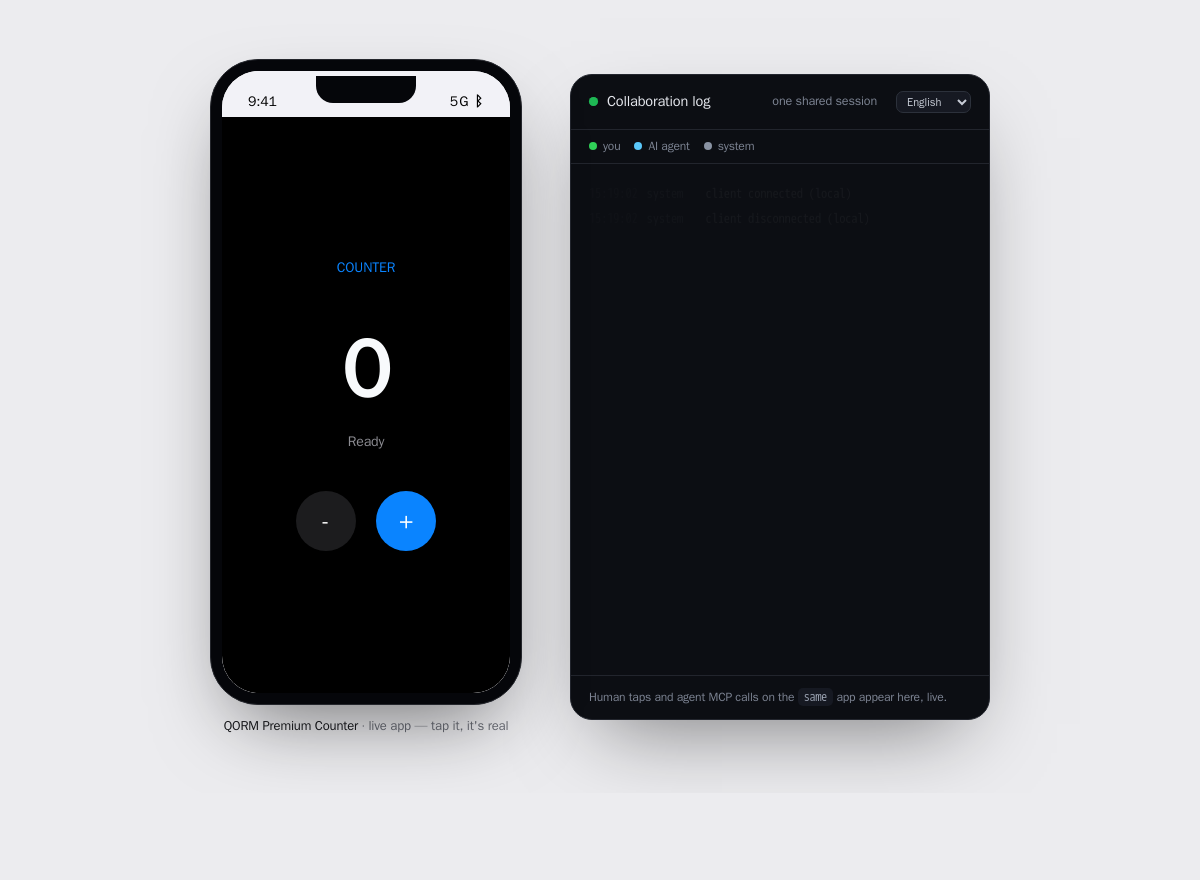 The app a human runs, beside the shared session log the agent reads over MCP — one live runtime.
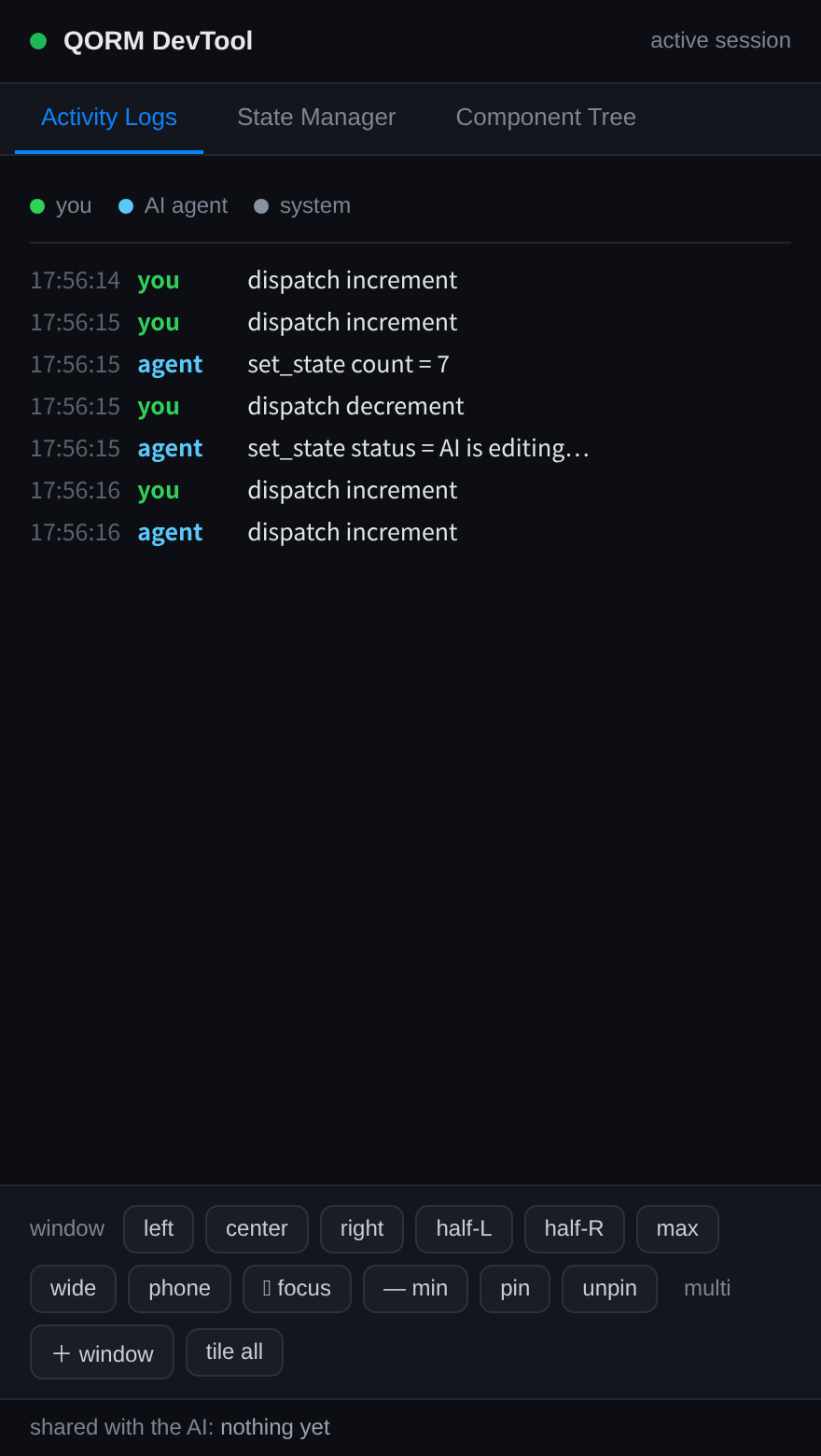 The DevTool lists your taps and the agent's MCP calls on the same app, oldest first, colour-coded by actor.
Safety model. qorm_simulate_action, qorm_preview_patch and qorm_diff run against a copy and never touch the live app. qorm_apply_patch commits a change, but it must carry the previewToken returned by a matching qorm_preview_patch of the same ops — so every committed edit is bound to a prior review. qorm_undo reverts the last apply.
The host window. The window an app opens in is configured by an optional qorm.config.json beside qorm.json (host/build-time config — it is NOT bundled or signed), with qorm.json display / platforms.desktop.window as the in-manifest fallback: width/height (start size), title, resizable (default true), chromeless (no title bar/border), transparent (clear background → custom-shape window), hideLog/hideTray. qorm.config.json wins over the manifest; qorm_inspect reports the resolved values.
Tool categories
The 25 tools fall into six intent groups. Pick by what you are trying to do:
- Understand (read-only):
qorm_inspect,qorm_render_html,qorm_capture_subtree,qorm_capture_canvas,qorm_a11y_tree,qorm_capabilities,qorm_get_node,qorm_source_location,qorm_query,qorm_list_actions,qorm_activity,qorm_export_scene,qorm_export_bundle - Operate (mutate live state):
qorm_dispatch,qorm_set_state - Simulate (side-effect-free):
qorm_simulate_action - Design (preview → apply, review-bound):
qorm_preview_patch,qorm_diff,qorm_apply_patch,qorm_undo - Verify (test + interpret the live render):
qorm_assert,qorm_validate,qorm_measure,qorm_check_layout - Window control (desktop):
qorm_window
| Tool | Parameters | What it does | ||||||||||||||||
|---|---|---|---|---|---|---|---|---|---|---|---|---|---|---|---|---|---|---|
qorm_window | h (integer), id (string), js (string), op (move\ | open\ | close\ | eval\ | tile\ | focus\ | minimize\ | pin\ | unpin), url (string), w (integer), x (integer), y (integer) | Control the desktop app window: op=move needs x,y,w,h (top-left px); op=focus/minimize/pin/unpin act on the window. The control engine positions the user's window. Supported on macOS and Windows desktop apps. | ||||||||
qorm_inspect | — | Inspect the QORM app: id, name, entry scene, scene ids, state schema, current state, action ids, static compiler diagnostics, the resolved host window config (window: width/height/title/resizable/chromeless/transparent — set via qorm.config.json or qorm.json display/platforms.desktop.window), and the design-token system (designTokens: name -> {type,value,enforce}) when declared, agentPolicy (effective MCP tool permissions from qorm.json agent.policy when declared), breakpoints (manifest width thresholds as breakpoint.<name> booleans), and capabilities (runtime gate policy when declared). Enforced color tokens hard-constrain apply_patch: a color style may only be set to one of their values. Read-only. | ||||||||||||||||
qorm_render_html | — | Render the current app to HTML so the agent can see what the UI looks like — the scene the session is actually on, after its route guard has been resolved (a guarded scene the session may not enter is never rendered). Read-only. | ||||||||||||||||
qorm_capture_subtree | id* (string) | Capture a specific node subtree by node id: returns isolated rendered HTML and child layout hierarchy for visual AI feedback. Read-only. | ||||||||||||||||
qorm_capture_canvas | id (string) | Capture the actual last-presented native Canvas pixel plane as a base64 PNG. Optional id still returns the full surface plus a physical-pixel clip rectangle for that node; it does not pretend to isolate or re-render the subtree. Fails loudly outside a running native Canvas host, before its first frame, for absent/invisible nodes, or when safety limits are exceeded. Read-only. | ||||||||||||||||
qorm_a11y_tree | — | Derive the accessibility tree for the entry scene: every node's ARIA role, accessible name and semantic state (checked/disabled/required/value), plus an audit of accessibility issues — interactive controls and images that would reach a screen reader with no accessible name. Use it to check a11y coverage or find what to fix. Read-only. | ||||||||||||||||
qorm_capabilities | — | List all built-in hardware/native capabilities: each capability's canonical name + widget type, the qormToNative op strings it accepts, its qormOn<Name> callback, and which platforms (ios/android/mac/linux/windows/web) implement it. Read-only — how an agent discovers what hardware exists and exactly how to call it. Mini-program is a static export target: no live tools apply. | ||||||||||||||||
qorm_get_node | id* (string) | Return a node's type, props, and child ids by node id. Read-only. | ||||||||||||||||
qorm_source_location | id* (string) | Reverse-lookup: given a node id (e.g. one a human clicked in the devtool or you found via qorm_query), return where it is declared in the app's source — file (relative to the app dir), 1-based line, and that line's text. Lets you jump straight to the JSON to edit it. Unavailable for a signed bundle (no source tree) or a templated id. Read-only. | ||||||||||||||||
qorm_query | hasProp (string), idContains (string), textContains (string), type (string) | Find nodes matching a selector (any of: type, textContains, idContains, hasProp — combined with AND). Returns each match's id, type, label and ancestor path. Use this to locate nodes before patching. Read-only. | ||||||||||||||||
qorm_list_actions | — | List available actions and a summary of each action's steps. Read-only. | ||||||||||||||||
qorm_activity | — | Read the shared session's live presence: returns {events:[who (human/agent) did what, oldest to newest], humanFocus:{element, secondsAgo}, humanTyping:{entry, secondsAgo}, humanFilled:{field, secondsAgo}, inflight:N} — so the agent sees what the human just did, the element they are on now, the text they last typed, AND which hidden (password) fields they filled (label only; a password value is never captured), and collaborates in context. Browser/WebView events and native canvas pointer/keyboard actions enter the same human activity stream and DevTool; both hosts report privacy-safe focus/typing/filled presence, and neither captures password values. inflight counts the background work the app still has open (async http.* requests plus waiting delay steps): 0 means the app has settled and what you read now is final, above 0 means a reply is still coming and the current frame is a loading state — read again before drawing conclusions. Only available in a running qorm run session. Read-only. | ||||||||||||||||
qorm_export_scene | — | Serialise the current (possibly patched) entry scene back to QORM JSON, so design work done via apply_patch can be saved or shipped. Read-only. | ||||||||||||||||
qorm_export_bundle | — | Serialise the whole current app (manifest + scenes + actions) into an UNSIGNED bundle (with content hash). A human/CI signs it (qorm sign) before OTA deploy — the agent never holds the signing key. Read-only. | ||||||||||||||||
qorm_simulate_action | action* (string), args (object) | Dispatch an action against a COPY of state and return before/after/changed. Side-effect-free: the live app is never modified. | ||||||||||||||||
qorm_dispatch | action* (string), args (object) | OPERATE the live app: dispatch an action (mutating state) and return the new state and rendered HTML. | ||||||||||||||||
qorm_set_state | path (string), value | OPERATE the live app: set a state path to a value and return the new state and rendered HTML. A dotted path NESTS, exactly like the state.set action step: path 'user.name' writes name inside user, so a binding {{ state.user.name }} reads it back. Computed (derived) values are read-only — a path inside the computed namespace is rejected, because they are republished from their declarations at every frame. | ||||||||||||||||
qorm_assert | checks* (array) | TEST the app: evaluate checks against current state and rendered HTML. Each check is {kind: 'stateEquals'\ | 'htmlContains'\ | 'nodeExists', ...}. Returns per-check pass/fail and overall. | ||||||||||||||
qorm_preview_patch | ops* (array) | DESIGN (safe): apply patch ops to a COPY of the app and return the resulting HTML plus a previewToken. Side-effect-free — the live app is unchanged. Ops: {op:'setProp',target,key,value} \ | {op:'addChild',target,node} \ | {op:'insertBefore'\ | 'insertAfter',target,node} \ | {op:'replace',target,node} \ | {op:'wrap',target,node} \ | {op:'move',target,into} \ | {op:'remove',target}. | |||||||||
qorm_diff | ops* (array) | DESIGN (safe): show the structural diff a patch would make (added/removed node ids and, per changed node, which fields) without touching the live app. Review before apply. | ||||||||||||||||
qorm_apply_patch | ops (array), previewToken (string) | DESIGN (commit): apply patch ops to the LIVE app. Must pass the previewToken returned by qorm_preview_patch for the same ops — apply is bound to a review. Snapshots the pre-image so it can be undone. If the app declares enforced color design tokens (see qorm_inspect designTokens), a setProp style op that sets a color style to a non-token value is rejected (also at preview time). | ||||||||||||||||
qorm_undo | — | DESIGN: revert the last applied patch, restoring the app to its state before that apply. Returns the reverted HTML and remaining undo depth. | ||||||||||||||||
qorm_measure | — | INTERPRET the LIVE render precisely: returns every component joining what the user expressed (type, text, state binding) with how it actually rendered — x,y,w,h, visible, computed color/background/fontSize/fontWeight/padding/borderRadius/border/opacity/zIndex/position/x-overflow, and (canvas) hostLimits for style keys or widgets this host cannot honour (e.g. fontFamily ignored, webview placeholder). The active rendering host supplies the measurement: the native canvas window exports its retained render graph, while a browser/WebView reports its DOM. Requires a running app with a rendering window/client; qorm mcp over stdio alone has no render host. For a deterministic one-shot canvas measurement without a window, use CLI qorm measure. Use this tool to see exactly what the human's live host rendered. | ||||||||||||||||
qorm_check_layout | checks* (array), viewportH (integer), viewportW (integer) | VERIFY the LIVE render against expectations; returns per-check pass/fail with actual values. checks is an array of {id, <assertions>}. Assertions: visible(bool) \ | type(widget-type string) \ | text(substring the component must contain, matched vs expressed OR rendered text) \ | noOverflow(bool, no horizontal overflow) \ | minW\ | maxW\ | minH\ | maxH(px number) \ | x\ | y(px number, ±3 tolerance) \ | within(id: this box must sit inside that id's box) \ | below(id: must start below that id) \ | backgroundNot\ | colorNot(substring that must be ABSENT — e.g. "255, 255, 255" to assert not-white in dark mode) \ | role(the rendered ARIA role string) \ | hasAriaLabel(bool) \ | contrastRatio(min WCAG ratio, e.g. 4.5 for AA normal text). Browser/WebView DOM reports include renderer-injected roles and computed contrast; the canvas graph reports derived role/accessibleName and WCAG contrast when the ancestor backdrop is an opaque colour (gradient/image/subtree opacity set contrastUnavailable). Canvas rows may include hostLimits naming ignored style keys or placeholder widgets. Example: [{"id":"wifi","type":"switchlisttile","visible":true,"within":"settings"},{"id":"chart","noOverflow":true}]. Fail-loud: an unrecognised assertion key (e.g. a typo) fails, and a within/below target id that was not measured fails as 'not found' — nothing silently passes. Requires a running app with a rendering window/client: native canvas checks use its retained render graph; browser/WebView checks use its DOM report. qorm mcp over stdio alone has no render host. Optional viewportW/viewportH (px) set the runtime viewport before evaluating, so responsive when branches resolve as if the window were that size — note the measured rects still come from the host's REAL window (a live browser client also overwrites the viewport on its next load/resize). |
qorm_validate | node (object), sceneId (string) | VALIDATE a QORM scene node or whole app against component schemas, widget catalog type rules, expression syntax, and design token constraints before patching or saving. Returns valid (bool) and an array of diagnostic warnings or errors. |
Parameters marked * are required; the rest are optional.
Examples
Representative calls (JSON-RPC 2.0, method tools/call):
Understand — read the app, then locate a node and jump to its source:
{"jsonrpc":"2.0","id":1,"method":"tools/call",
 "params":{"name":"qorm_inspect","arguments":{}}}

{"jsonrpc":"2.0","id":2,"method":"tools/call",
 "params":{"name":"qorm_query","arguments":{"type":"button","textContains":"Save"}}}

{"jsonrpc":"2.0","id":3,"method":"tools/call",
 "params":{"name":"qorm_source_location","arguments":{"id":"saveBtn"}}}
Operate — dispatch an action and set a nested state path:
{"jsonrpc":"2.0","id":4,"method":"tools/call",
 "params":{"name":"qorm_dispatch","arguments":{"action":"increment"}}}

{"jsonrpc":"2.0","id":5,"method":"tools/call",
 "params":{"name":"qorm_set_state","arguments":{"path":"user.name","value":"Ada"}}}
Design — preview a patch, review the diff, then commit with the token:
{"jsonrpc":"2.0","id":6,"method":"tools/call",
 "params":{"name":"qorm_preview_patch","arguments":{"ops":[
   {"op":"setProp","target":"saveBtn","key":"text","value":"Save now"}]}}}

{"jsonrpc":"2.0","id":7,"method":"tools/call",
 "params":{"name":"qorm_apply_patch","arguments":{
   "ops":[{"op":"setProp","target":"saveBtn","key":"text","value":"Save now"}],
   "previewToken":"<token from qorm_preview_patch>"}}}
Verify — assert state and check the live layout:
{"jsonrpc":"2.0","id":8,"method":"tools/call",
 "params":{"name":"qorm_assert","arguments":{"checks":[
   {"kind":"stateEquals","path":"count","value":3},
   {"kind":"htmlContains","text":"Saved"}]}}}

{"jsonrpc":"2.0","id":9,"method":"tools/call",
 "params":{"name":"qorm_check_layout","arguments":{"checks":[
   {"id":"saveBtn","type":"button","visible":true,"noOverflow":true}]}}}