
QORM Mobile Platform
Mobile requires dedicated adaptation; it cannot simply reuse the Desktop implementation.
Package it
qorm package examples/hardware -p ios     -o hardware-ios      # an Xcode project
qorm package examples/hardware -p android -o hardware-android  # an Android project
Distributable (store-ready) builds add --release:
qorm package app -p ios --release --team TEAMID \
    [--export-method app-store-connect] [--upload]   # archives and exports an .ipa
qorm package app -p android --release [--apk]        # signs an .aab with a managed keystore
    # keystore auto-generated at <app>/.qorm/release.keystore — BACK IT UP
qorm package app -p ios|android --release --app-version 1.2.0 --build 42
Over-the-air updates for a packaged app: pass --update-url <server> --trust <key.pub> (strictly paired) and the shell checks the update server after first paint, verifies each update against the trust key (ed25519), hot-swaps without a reload, and keeps a one-step rollback copy — see security-model.md.
Because the runtime on device is the same single-threaded Go→WASM build the web package uses, every http.* step runs on a background worker there, whether or not its JSON says "async": true — so the steps after a request run while it is still open, and anything depending on the reply must sit in onSuccess / onError. See Web and First action.
The app runs offline on device via Go→WASM in a WebView. Examples: hardware (the capability catalog exercised), i18n (locales, plurals, currency, RTL). See the support matrix for per-capability platform support.
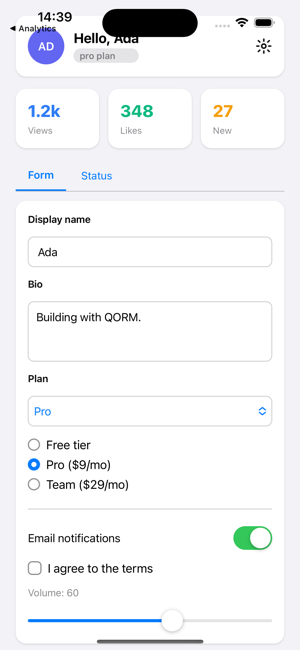 On iOS, native controls (switch, slider, text field) render from the same JSON; the Go-WASM runtime drives them through the Swift bridge.
Note: the screenshot above is iOS. This build environment has no Android emulator, so there is no Android preview to show; the qorm package -p android command and the WebView runtime path are otherwise identical.
Architecture
Mobile App (WebView)
  ↓
Go QORM Runtime, compiled to WASM (cmd/qorm-wasm, Go→WASM shipped with the app)
  ↓
qormToNative op
  ↓
Native bridge (iOS: package_native.go iosBridgeBody() / Android: androidMainActivity())
  ↓
Swift / Kotlin thin bridge
  ↓
iOS / Android system APIs
Dynamic Bundle
Mobile can load bundles dynamically via a built-in interpreter:
qorm.bundle.json
  ↓
version/hash/signature/keyId validation
  ↓
pre-parse
  ↓
activate
  ↓
rollback on failure
Bundle signature enforcement requirements
- The device must verify
hash,signature,keyId, andminRuntimeVersion. - Unknown or revoked signing keys must not be activated.
- If a new Bundle fails to activate, it must roll back to the
last known-good bundle. - In offline scenarios, use the most recent trusted trust metadata / revocation snapshot.
Requires dedicated handling
safe area
orientation
keyboard show/hide
IME composition
touch gesture
navigation stack
permissions
lifecycle
background/foreground
memory warning
remote bundle update
rollback
iOS
Recommendations for iOS:
Go runtime compiled to WASM (cmd/qorm-wasm), packaged with the app
Swift thin bridge (native bridge fills capabilities missing from the Web API, such as Bluetooth/NFC)
WebView with a built-in Runtime, running the Bundle locally
Bundle as UI description data
A fixed Host Capability allowlist
Bundles should not introduce unreviewed low-level Native APIs.
Android
Recommendations for Android:
Go runtime compiled to WASM (cmd/qorm-wasm), packaged with the app
Kotlin thin bridge (native bridge fills capabilities missing from the Web API)
Minimal JNI calls
Host Capability registration
Bundle cache
Mobile approval persistence
- By default, approvals should be bound to an app session or a user session.
- After an app update, account switch, Bundle switch, or policy change, prior approvals should be re-evaluated.
- For dangerous capabilities such as file writes, system sharing, or external-domain access, old approvals should not be reused indefinitely.
No JIT
Mobile does not use a Native JIT. Today the only render path is internal/render's HTML/CSS, displayed by the platform WebView (the Go runtime ships as WASM). GPU-first rendering (typed IR, execution plan, dirty tree, texture atlas) is roadmap work — see planning/.