
Interpreting & verifying a QORM app
QORM's goal is to let an AI completely and precisely interpret and verify everything a user expressed in an app — its layout, styles, behavior and translations — using the framework itself, with no external browser.
There are two measurement sources with one JSON shape:
- The default, pure-Go CLI renders once into the software canvas, then exports
geometry and computed styles from the same retained graph used for painting. This is deterministic and needs no window or external browser.
- A live host measures what the human is actually viewing. The native macOS
canvas window exports its graph after a rendered frame; browser/WebView hosts walk the DOM with getBoundingClientRect, read computed styles, and POST the result to /measure.
The framework joins either rendered result with the user's intent (each node's type, text, and state binding from the app JSON). For every component you get both what the user asked for and what the selected backend rendered.
qorm measure — read the real render
qorm measure <app-dir> [--width 400] [--physical] [-o report.json]Renders the app, self-measures, and prints one row per component joining intent with result:
{ "id": "wifi", "type": "switchlisttile", "intent": {"label": "Wi-Fi", "binding": "{{state.wifi}}"},
  "x": 32, "y": 499, "w": 336, "h": 47, "visible": true,
  "color": "rgb(0,0,0)", "background": "rgba(0,0,0,0)", "fontSize": "15px",
  "padding": "…", "borderRadius": "…", "overflowX": false }
Fields per component: id, type, intent (text/label/binding), x y w h, visible, tag, text (for leaf nodes), and computed color, background, fontSize, fontWeight, textAlign, padding, margin, borderRadius, border, opacity, zIndex, position, overflowX.
In a normal build this is a headless pure-Go canvas render at the requested logical width (height comes from qorm.json, default 820). Coordinates are logical CSS pixels by default; --physical keeps canvas device pixels. A -tags desktop build intentionally exercises the HTML/WebView path instead; WebView measurements are always CSS pixels, so --physical has no effect there.
qorm check --checks — verify expectations
qorm check <app-dir> --checks checks.json [--width 400] [--physical] [-o report.json]checks.json is an array of {id, <assertion>…}. Each assertion is verified against the real render; the report gives per-check pass/fail with actual values.
| assertion | meaning | |
|---|---|---|
| `visible: true\ | false` | the component is / isn't actually visible |
type: "<widget>" | rendered from the expected node type | |
text: "<s>" | contains <s> (matched against expressed OR rendered text) | |
noOverflow: true | no horizontal content overflow | |
minW / maxW / minH / maxH: <px> | size within bounds | |
x / y: <px> | position (±3px tolerance) | |
within: "<id>" | this component's box sits inside that id's box | |
below: "<id>" | starts below that id | |
backgroundNot / colorNot: "<substr>" | that substring is ABSENT (e.g. "255, 255, 255" to assert not-white in dark mode) | |
role: "<role>" | the rendered ARIA role (incl. roles the renderer injects, e.g. root→main, modal→dialog) | |
hasAriaLabel: true | the element exposes an aria-label | |
contrastRatio: <n> | text/background contrast is at least n (WCAG AA: 4.5 normal, 3.0 large), computed against the effective background |
Backend boundary: geometry, visibility, text, overflow, and the listed computed box/style fields work on both measurement sources. On HTML/WebView, accessibility assertions read the rendered DOM, so role can include renderer-injected semantics and contrastRatio is computed against the effective background. The canvas graph currently reports author-supplied role / ariaLabel; it does not yet compute contrast, so contrastRatio fails as unavailable rather than silently passing. focusTrap is intentionally rejected on every backend: focus containment is dynamic Tab-order behavior, not a static snapshot.
Checks fail loud: an unrecognised assertion key (e.g. a typo) fails, and a within/below target id that was not measured fails as 'not found' — nothing silently passes.
[
  {"id": "nav",      "type": "appbar", "visible": true, "y": 0, "text": "Today"},
  {"id": "wifi",     "type": "switchlisttile", "visible": true, "within": "settings"},
  {"id": "chart",    "noOverflow": true, "maxW": 370}
]
qorm check step-flow — verify behavior
Pass a {"steps":[…]} object instead of an array to verify interactions: each step applies an action, waits for the re-render + re-measure, then checks.
{ "steps": [
  { "name": "increment", "do": {"dispatch": "increment"}, "checks": [{"id": "number", "text": "1"}] },
  { "name": "go dark",   "do": {"setState": {"path": "theme", "value": "dark"}},
    "checks": [{"id": "card", "backgroundNot": "255, 255, 255"}] }
] }
The default pure-Canvas driver accepts exactly one operation per step:
{"dispatch":"<action>", "args":{…}}{"setState":{"path":…, "value":…}}(or the shorterstatealias){"press":"id"}or{"press":{"id":"id"}}{"type":{"id":"field", "text":"hello", "clear":true}}{"key":"Enter"}or `{"key":{"key":"Tab", "id":"field",
"shift":false, "ctrl":false, "alt":false, "meta":false}}`
{"scroll":{"id":"list", "dx":0, "dy":120, "ctrl":false}}{"wait":250}(milliseconds) or{"wait":"250ms"}(Go duration)
Press/type/key/scroll drive the same retained graph and input handlers as the native window; targets are revealed before input. Canvas wait advances its animation/timer clocks deterministically and does not sleep. A -tags desktop build keeps the established WebView flow subset (dispatch and setState).
qorm check --audit — one-shot regression
qorm check <app-dir> --auditNo hand-authored checks: verifies generic invariants over every visible component — non-zero size, no horizontal overflow, within the window (horizontal-scroll/paged containers and their descendants are exempt). Returns {ok, visibleComponents, issues, details}.
In the live shared session (MCP)
While a human runs the app, an agent on the same session can call:
qorm_measure— the complete intent + rendered result (as above).qorm_check_layout— passchecks(same schema as--checks), get
per-check pass/fail with actual values.
qorm_capture_canvas— capture the native Canvas host's actual last-presented
pixel plane as a base64 PNG. With optional id, the PNG remains the full surface and clip locates that node in physical pixels; it is not an isolated subtree render. It fails loudly when no Canvas host/frame exists or a node is absent/invisible. Browser/WebView sessions do not synthesize Canvas pixels.
qorm_capture_canvas({})
qorm_capture_canvas({"id":"card"})  # full PNG + card clip metadata
Both read the active host's latest measurement, so the agent sees exactly what the human sees: the current retained graph in the native canvas window, or the current DOM in a browser/WebView. Use HTTP /mcp on the running qorm run session. A standalone qorm mcp <app> stdio server has no rendering host, so these two tools report measurement unavailable; use CLI qorm measure / qorm check for headless canvas verification.
For a file artifact without a live host, qorm shot <app> -o out.png renders the same pure-Go Canvas backend headlessly (default 440x720, 4096 px/edge and 16 MP safety limits). Use qorm_capture_subtree when isolated HTML rather than native pixels is the intended evidence.
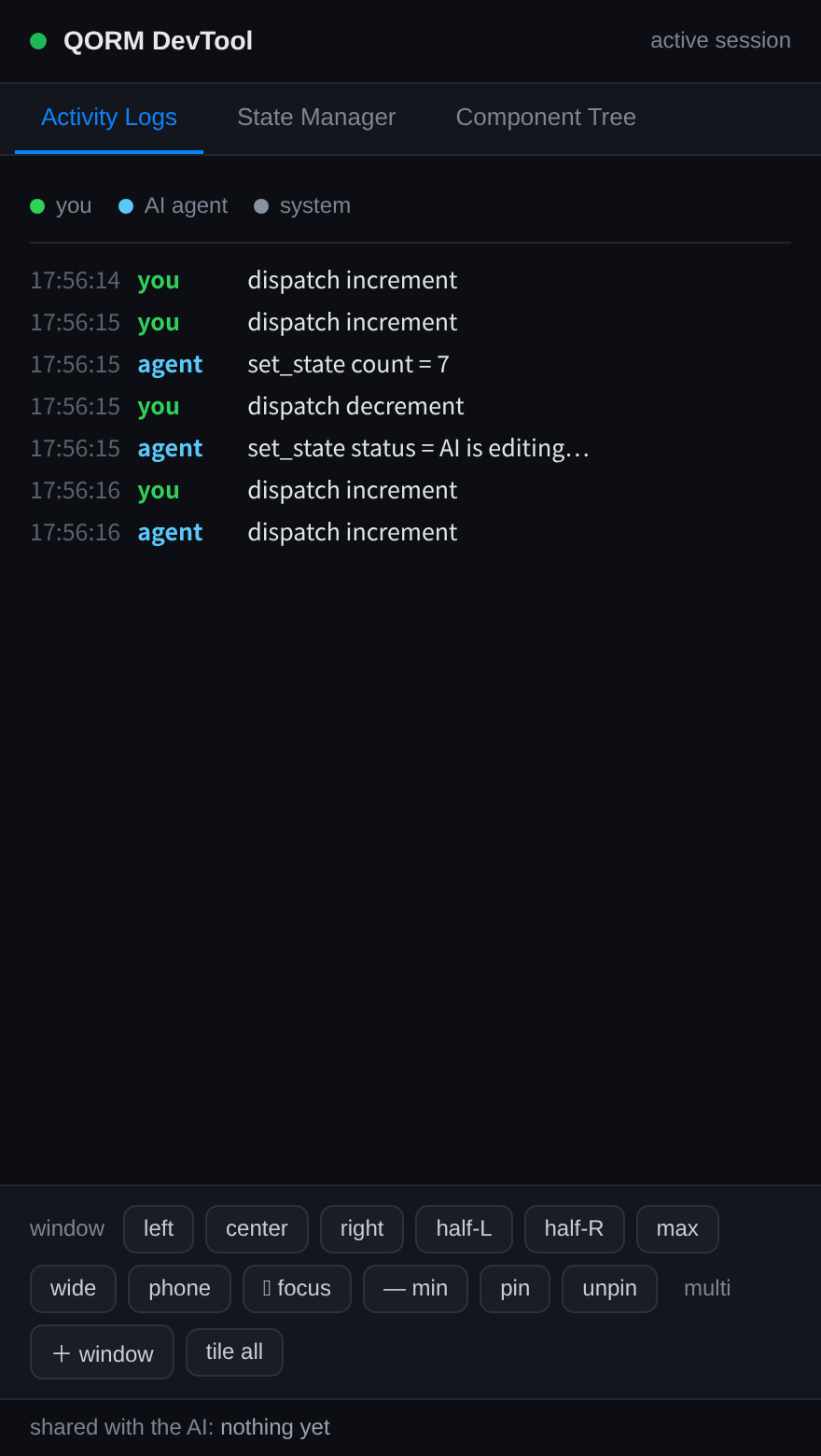 In a shared session the agent reads the same live render you see; the DevTool interleaves both sides' activity.
Note: the qorm measure and qorm check reports are structured CLI/JSON (shown as code blocks above) — there is no terminal screenshot for them. The image here is the DevTool view of the live shared session, not a captured report.
On-device live debugging
qorm run <app> --lanBinds to the LAN and prints how a physical phone joins the same live session as the dev machine and agent:
- Wi-Fi: open the printed
http://<lan-ip>:PORT/in the phone browser
(same network). Real LAN addresses are listed first.
- USB (Android):
adb reverse tcp:PORTis set up automatically, so the
phone opens http://localhost:PORT/.
Once connected, the device is just another client of the live server:
- agent edits (over MCP) hot-reload on the device instantly (SSE),
- the device's self-measurement posts back to
/measure, soqorm_measure
and qorm_check_layout report the real device's rendering — actual screen size, fonts and WebView — not a simulation,
- SSE connect/disconnect is written to the activity log with the client IP,
so a device joining the session is visible.
This makes interpret-and-verify work against real hardware, closing the loop from authoring to on-device confirmation.
One command for everything
bash scripts/verify.shRuns go test ./... (render markers, actions, i18n formatting, fuzz, determinism) plus a self-measured layout audit of every example, aggregated to a single ALL-GREEN / regressions verdict. No external browser.
Notes
- The default CLI is an offscreen canvas render, including native input step
flows. Build with -tags desktop only when you intentionally need WebView/ DOM parity.
- Live MCP measurement needs an active rendering host. On macOS the default
qorm run canvas window supplies it directly; a browser or -tags desktop WebView supplies DOM measurement. Stdio-only qorm mcp does not.
visible: false+ zero size is normal for inactive tab content, closed
overlays (modal/dialog/sheet with open:false), and empty conditional text — the audit only flags visible components.