
Getting Started with QORM
This tutorial builds a minimal QORM app from scratch: a counter. Three files — manifest, scene, and action — and qorm run gets it going.
Rather have your AI build it? The two copy-paste prompts live in Build with your AI.
Directory structure
A QORM app is just a directory: qorm.json is the manifest, scenes/ holds the UI, and actions/ holds the actions.
my-app/
├─ qorm.json
├─ scenes/
│  └─ main.json
└─ actions/
   └─ increment.json
qorm.json — manifest
Declares the app metadata, the entry scene (entry), and the global state (globalState: a schema plus initial values).
{
  "type": "app",
  "id": "my_app",
  "name": "My App",
  "entry": "main",
  "globalState": {
    "schema":  { "count": "number" },
    "initial": { "count": 0 }
  }
}
scenes/main.json — UI
Declare the UI as a node tree. Text goes in the text field, and {{ state.count }} interpolates global state; a button uses onPress to trigger an action (a string is the action name).
{
  "type": "scene",
  "id": "main",
  "root": {
    "type": "column",
    "id": "root",
    "style":  { "padding": 32, "gap": 16 },
    "layout": { "width": "fill", "height": "fill", "align": "center", "justify": "center" },
    "children": [
      { "type": "text",   "id": "count_text", "text": "Count: {{ state.count }}" },
      { "type": "button", "id": "inc", "text": "+1", "onPress": "increment" }
    ]
  }
}
actions/increment.json — action
An action is a sequence of steps. Here state.set sets count to {{ state.count + 1 }} — inside {{ … }} is a full expression that can read global state and do arithmetic.
{
  "type": "action",
  "id": "increment",
  "steps": [
    { "type": "state.set", "path": "count", "value": "{{ state.count + 1 }}" }
  ]
}
Running
Point at the app directory (not a single file):
qorm run my-app # opens live in the browser; click +1 and the count incrementsThe server hosts the app, handles button events, re-runs actions, and swaps the re-rendered UI back into the page — that is the run loop.
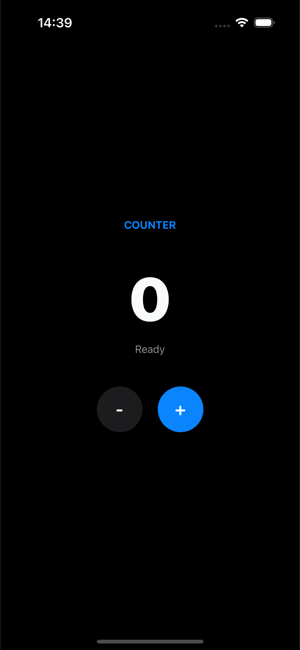 The three files above render to this:
 qorm run serves the counter live, and the + button drives the action.
Rendering a static snapshot
Render a static HTML snapshot without launching a browser (good for CI / previews):
qorm render my-app -o my-app.htmlNext steps
- Expressions — the
{{ … }}language every binding is written in. - Widget catalog — every node type the renderer accepts (code-generated, authoritative).
- Capabilities — native capabilities like camera, location, and Bluetooth.
- User middle layer — add your own native ops with a single Go file.
- For more runnable examples, see
examples/in the repo (counter / todo / dashboard / hardware / …).